
Chuzi gets you
unstuck.
It analyzes your history, tells you when it is time to add weight and guides you set by set. Free, with no ads on Android and iPhone.
- 800+exercises with technique cues
- 15ready-made programs
- 8overload rules
- 16muscles with a rank
- 3GPS cardio modes
- HealthApple Health · Health Connect
Chuzi tips
Automatic progressive overload: your next record, worked out from your sets
Eight rules check your workouts and each day show you only the most useful tip, with your sets and the reason why.
- Exact load increases. Spots when you own a weight and tells you how many kilos to add.
- Plateau detector. Warns you when an exercise stops going up and tells you how to get it moving.
- Volume check. Warns you when a muscle is short on sets or a day piles up sets that no longer pay off.
AI coach
Ask your coach and get answers built on your own numbers
It looks at your routine and everything you have logged in the last 12 weeks to give you a concrete assessment: what is working, what has stalled and what it would change.
- It suggests, you decideIf it recommends changing your routine, it shows you the changes and they only apply when you tap Apply. You can undo them.
- Your chats stay on your phoneOnly your last 50 are saved, on your phone. The server answers and does not keep them, unless you report a reply.
- Free during launchWith a daily number of questions and an account with a verified email. It is guidance and does not replace a doctor or a professional coach.
Fast logging
Log every set in 2 taps. Before your heart rate drops.
The routine remembers where you left off. You open the app, tap Start and tick your sets. On each set you see what you did last time and the routine’s target.
- Rest starts on its ownAnd keeps counting with the screen off.
- Targets that go up on their ownA rep range per exercise, and more weight when you reach the top.
- Change on the flyAdd sets or exercises, reorder them and save the changes to your routine when you finish.
- No ads, works offlineNothing between your sets, and you can log without a signal.
When you finish
Your summary, with every record
Volume, sets and duration compared with last time, the muscles you worked and how that day's volume moves week by week.
Programs and catalog
Your program knows which day is next
15 ready-made programs (full body, upper-lower, Push Pull Legs, 5×5, Arnold, at home…) or your own. And in Discover, routines people publish, ready to use.
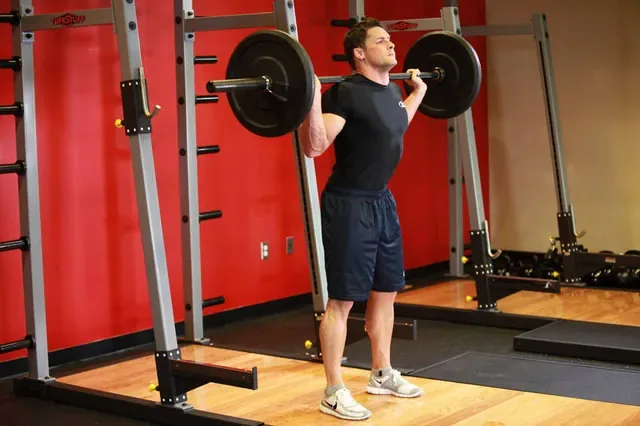
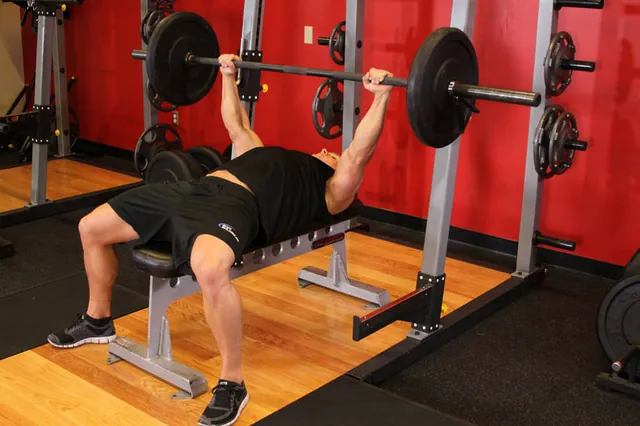
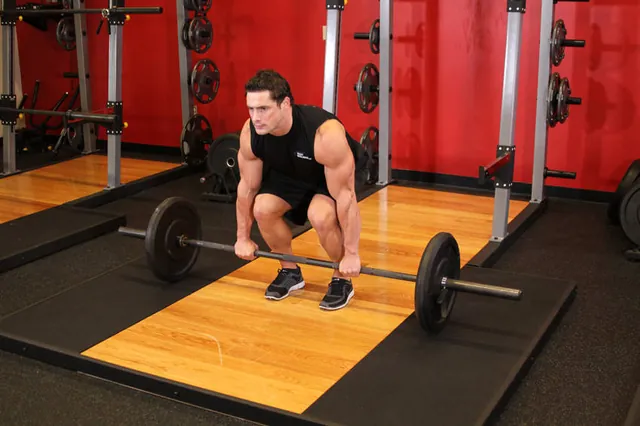
800+ exercises, all with their technique cues
156 with photos and steps. All with the muscles they work on a body map and the equipment they use. Search works with or without accents.
- Import from other appsYour history in CSV, with no duplicates.
- Your data, yoursA full backup to a file and export to CSV.
Cardio with GPS
Run, ride or walk, in one tap
Pick the activity and head out. GPS measures distance, pace and elevation, and each week you see your kilometres day by day against the week before.
- Four ways to head out. With no route and recording as you go, repeating an outing, following a saved route or drawing a new one on the map before you leave.
- Against yourself, live. When you repeat an outing you see how far ahead of or behind that day you are.
- Every detail when you're back. Your route on the map, the time for each kilometre, the elevation profile that explains the slow ones and your pace during the outing.
Your records
Every record, with its medal
Fastest 1K, 5K and 10K, longest distance, longest time and most elevation, running and cycling. Each record earns bronze, silver, gold or platinum, and tells you how far you are from the next one.
- They update themselvesBeat a record and the outing tells you, and your wall catches up.
- The next metal, in sightEvery record shows its ladder of metals and the one you need next: “Next: Gold at 4:30”.
- Your outings at a glanceDistance, time, pace and the record you beat on each one, month by month.
Your progress
Months of training, at a glance
Day-by-day consistency, volume by muscle, your recent records and how the estimated 1RM of each exercise evolves.
- Consistency. Each square is a day. More color, more volume. With your streak and your average days per week.
- Exercise history. Sets, records and progress for each one.
- Weight and measurements. Weight, body fat and waist over time. And goals per exercise, with a notice when you reach them.
Ranks by muscle
From “Rookie” to “Chuzi”: find your real strength level in every muscle
Your best lift against everyone who does the same exercise, with no names. The figure is painted with your rank in each muscle, from Rookie to Chuzi.
- Where each rank comes fromTap a muscle to see which exercise counts and how many kilos you need for the next rank.
- Then and nowCompare your figure with the one from three months ago.
Weight, measurements and macros
Calorie and macro counter, built in
Scan the barcode and you're done. You see what you've had and what's left for the day, and weight and steps come in with Health Connect or Apple Health, next to your workouts.
- BarcodeFind the food and log the portion.
- Calories and macrosProtein, carbs and fat against your target.
- Your mealsBreakfast, lunch, dinner and snacks, each with its calories.
Photo with AI
Take a photo of your plate and the AI works out the grams
Take a photo of your food and an AI suggests which foods are there and how many grams, with their calories and macros. Adjust whatever you need and log it to your meal in one tap.
- Fix it in one tapAdd or take away 10 g, remove a food or add a note to refine the result.
- It tells you how far to trust itIt tells you whether the plate is clearly visible or the grams are worth checking, because it is an estimate.
- Your photo isn't storedIt is analyzed and discarded. While it is in testing, there is a daily number of photos.
 New4:45

 7
 6
 0
FAQ
Common questions
Is Chuzi a free gym app, or does it have ads?
Chuzi is free and has no ads. Every feature is unlocked, with no card required and no ads between sets.
How does the app work out when I should add weight (progressive overload)?
Eight rules check your history. When you complete every rep at the same weight for several sessions in a row, Chuzi suggests adding load (for example, +2.5 kg). It also spots when an exercise stalls, when a muscle is short on weekly volume and when a day has more sets than pay off. Each day you only see the most useful tip.
Does it work offline?
Yes. Workouts are stored on your phone, so you can log them without a signal. You only need a connection to sync, for the social side, for the cardio map and to look up food by barcode.
Do I need an account?
Yes, with your email or with Google. It gives you a backup in the cloud, lets you recover your data if you change phones and lets you use the social side. Crash reports come switched off and you turn them on if you want.
What does the photo with AI do?
You take a photo of your plate and an AI (Google’s Vertex AI) estimates which foods are on it and how many grams, with their calories and macros. You review the result, correct it if needed and log it. The photo is not stored. It is in testing, needs an account with a verified email and has a daily number of photos.
Is there an iPhone version?
Yes. Chuzi is on the App Store for iPhone and on Google Play for Android.
How can I import my workout history from Hevy, Strong or a CSV?
Export your workouts as CSV from Hevy or Strong and open the file in Chuzi from Profile, in Your data. Chuzi recognises the exercises, understands kilos and pounds and doesn’t duplicate what you already had.

Friends and ranking
Train with friends and compare your progress
Invite with a code, do the same routine each at your own pace and compare when you finish. If you want, your records count in the global ranking of each exercise.